
One platform, from lead to complete.
QXM Pro is the system your team works in every day. Every department sees only the part it needs, and nothing is exported, re-keyed or converted between them, so the whole company works from one set of data.
- 01Sales Pro
- 02Schedule Pro
- 03Inventory Pro
- 04Shop Pro
- 05Field Pro
- 06Order Pro
Every area of your business.
Each one below is a working part of the platform, with the people who use it seeing only what their job requires.
Sales Pro
Lead to contract
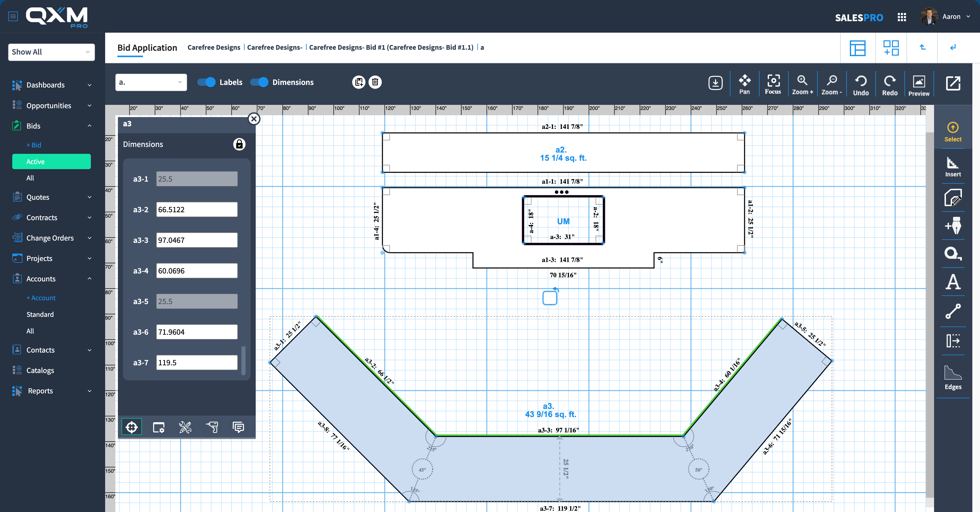
Every bid is calculated from the job itself: the labor each process will take, the material the layout consumes, the supplies it burns and the items it requires. The bid is then priced to reach the net margin you set, using your shop's own performance. No item catalog stands in for the work.
- Lead and opportunity tracking
- Drawing tools for any application, from countertops and islands to showers, fireplaces and outdoor kitchens
- CAD-level drawings without CAD complexity, passed straight to the shop and field
- Area-by-area calculation, so a guest bath and a master suite each carry their own complexity
- Labor time predicted per process, down to the minute
- Slab nesting, yield and waste calculated before contract
- Version control preserving every bid, price and selection
- Change orders calculated as the difference between versions, with no manual itemizing
- Quote tracking and digital signing
- Contract management with full version history
- Detailed budgets built per job, by application and by process
- Projects, notes and documents held together, with completed workflow tasks recorded against the job
Replaces Rate cards, spreadsheets, a CAD seat and the estimator's memory.
Schedule Pro
The control center for capacity
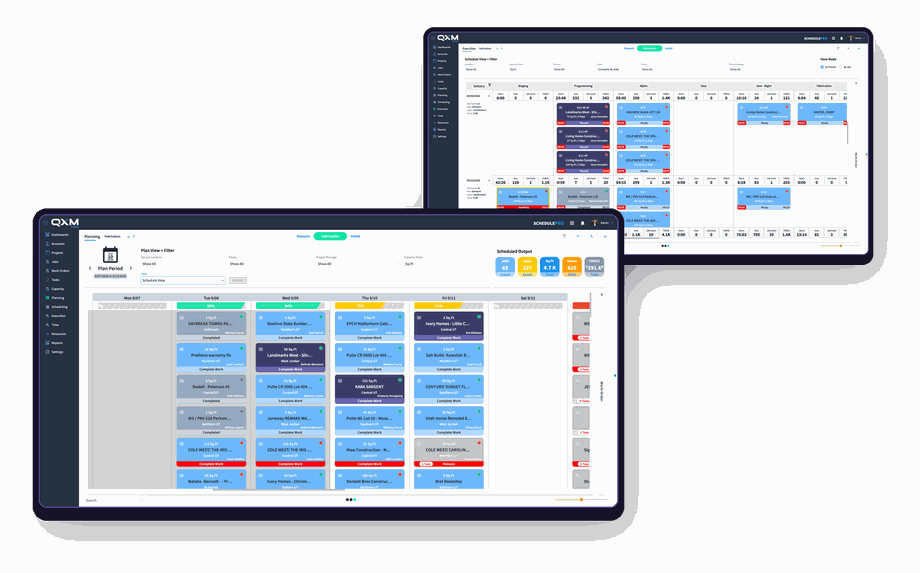
Schedules are generated from the predicted labor and your real capacity, so each resource is given the time the work actually takes. Schedule Pro protects capacity, levels resources across teams, and builds every schedule to land on time and under budget.
- Measure, fabrication and installation managed as three native work orders
- Sequence enforced, with no fabrication before measure and no install before fabrication
- Lead times and material readiness checked before a date is committed
- Buffer time built in and consumed systematically as the schedule moves
- Appointment, worker, map and load views
- Auto-advance keeps unreleased work visible
- Rework holds and application splits
- Unplanned work-order tracking
- Capacity consumption visible months out
Replaces Wall calendars, shared spreadsheets and daily firefighting.
Inventory Pro
Buy, hold and allocate material
Purchasing and warehouse operations built for slab and sheet goods, driven by the material your scheduled work actually needs.
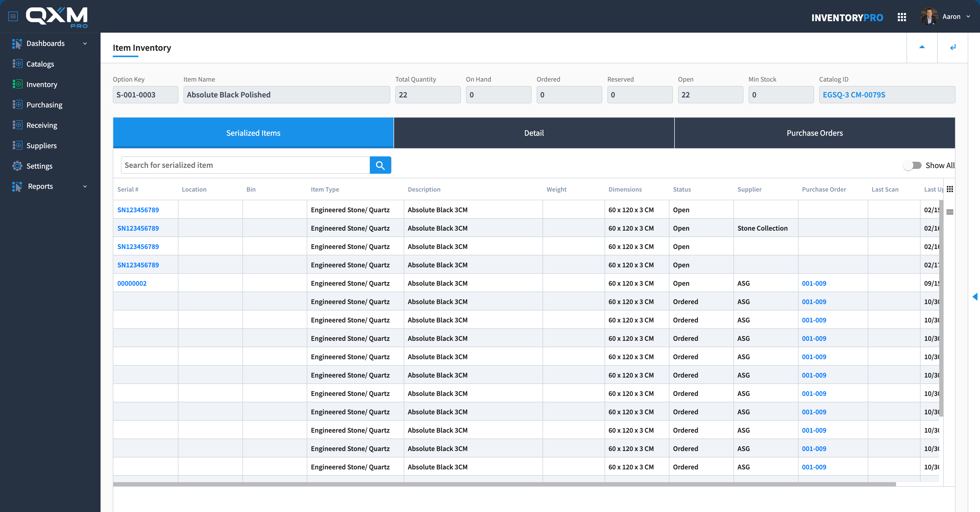
- Product and item catalogs with multi-supplier variants, pricing and lead times
- Stock and non-stock handled separately, so custom orders never pollute the catalog
- Demand planning driven by scheduled work rather than history alone
- Purchasing and receiving as separate workflows with their own controls
- Advance shipping notices, partial receipts, and short or over delivery exceptions
- Directed putaway and staging, with barcode and QR labeling and scanning
- Multiple locations and yards with bin-level tracking
- Job allocation with native remnant serialization, creating child items an ERP cannot track
Replaces Whiteboards, slab tags and a separate inventory package.
Shop Pro
Run the floor from the same data
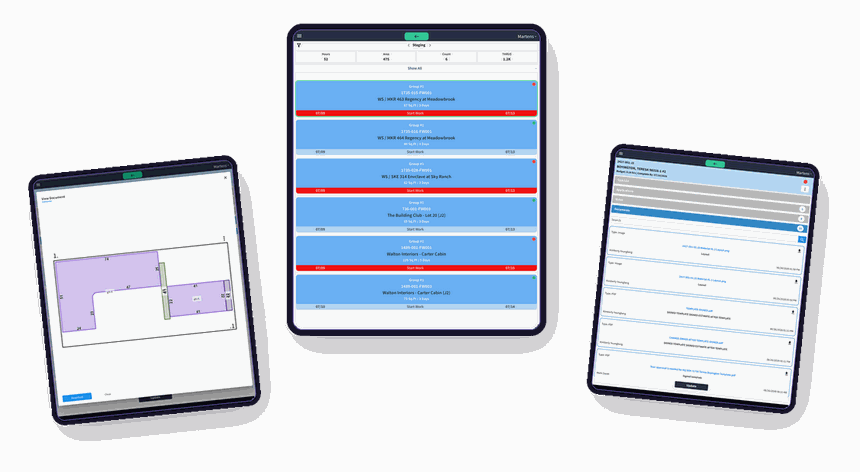
The shop works from the job the estimate was built on, including the drawings, so what gets fabricated matches what was priced and the time it took comes back into the model.
- Work orders carrying the predicted hours for each process
- Actual time captured by activity: cutting, polishing, edge work, fabrication
- Start-stop time tracked against the predicted hours
- Material allocated to the exact requirement of the job
- Quality checkpoints before work moves downstream
- Rework capture at the point it happens
- Job costing fed back to Director as it is created
Replaces Paper travelers and end-of-day status meetings.
Field Pro
Carry the job to the site
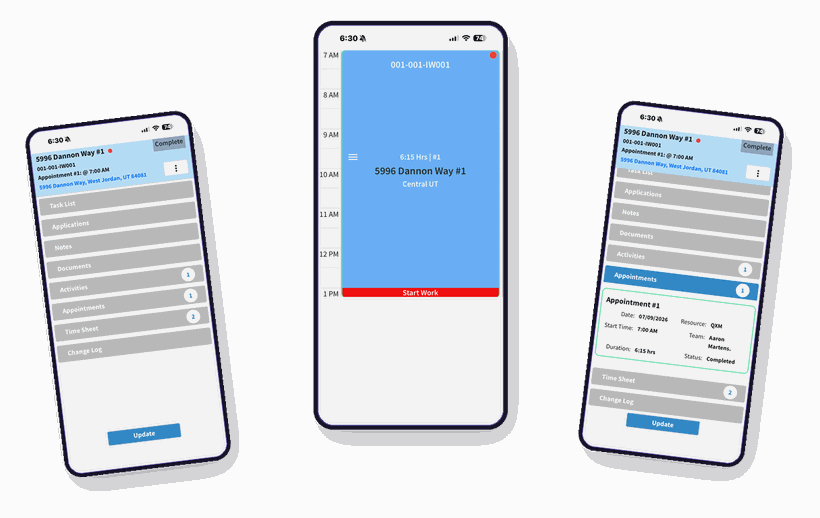
Templating, delivery and installation crews work from the same job record, with passkey sign-in so crew login never becomes a help-desk problem.
- Measure and install work orders in the field
- Activity-level time for measuring, installation and cleanup
- Photo and video capture on the work order
- Issues documented and change orders started from the site
- Material usage recorded, triggering restock
- Crew assignment and daily routes
- Customer sign-off and project completion
- Passkey authentication for field workers
Replaces Phone calls, texted photos and paperwork that returns a day late.
Know what every community and plan returns.
Production work is negotiated once and executed for years, with the price set long before most of those homes are sold. Big assumptions sit inside that price. Material yield is expected to run high, because the same plans in the same colors should nest well. Labor is expected to run low, because crews working one neighborhood finish more in a day.
The community is bid in Sales Pro. Order Pro takes it from there, processing every home the builder sells against the option matrix that was agreed. Combinations that the contract does not allow are blocked before they become a problem, and every order carries its true cost, including travel and the trips a community absorbs.
Those assumptions get tested every morning. A community falls short, another one covers it, and the shop often cannot tell which is which. Order Pro measures what each community and plan actually returns, so the next negotiation starts from real performance. Orders from Order Pro and contracts from Sales Pro both become projects in Schedule Pro, so a shop serving builders alongside retail and custom work runs all of it on one schedule.
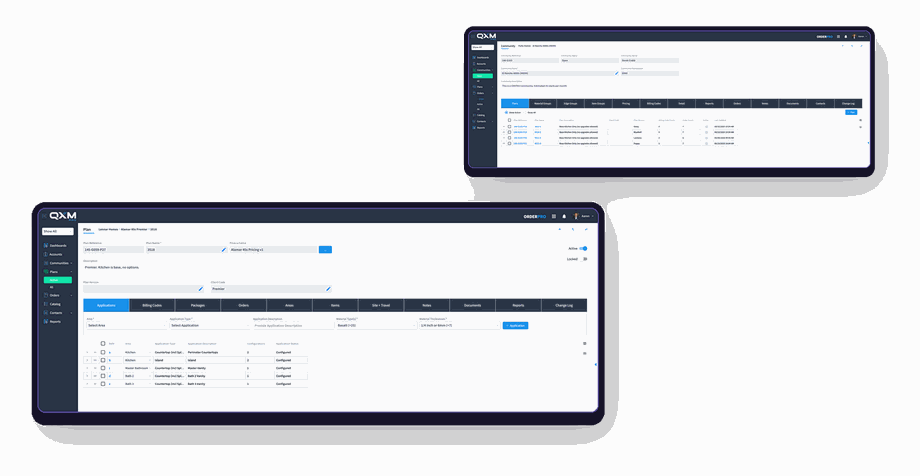
- Plan catalogs with options, tiers and billing codes
- Community rules that validate every homeowner selection
- Invalid combinations blocked before the order is taken
- Price and release each home as it sells
- Travel and trip costs allocated by community
- Plan revisions and price changes over a community's life
- Yield and labor measured against what the agreement assumed
- Performance reported by community and by plan
No other system in this market does this. Competing products leave production shops copying a sales order for every home sold, keeping the community's pricing in a spreadsheet alongside it, and learning how a community performed only once it is finished.
Director
Reports and dashboards live inside every module, where the decisions are made. Director is where pricing is defined and where performance is controlled. It holds the model your business runs on: what work costs you, what it should earn, and where the operation is falling short of what it is capable of.
Define your pricing
Cost and price structure by channel and account segment, target margins, and the risk factors that adjust a price as a job gets harder. Set once, applied to every bid that follows.
Control performance
Predicted against actual, job after job, so the model stays anchored to your real performance. Clients guide the predictions and set their own performance targets rather than accepting an industry norm.
Find what to improve
Dashboards and analytics surface the patterns on their own, along with tuning recommendations: work priced below what it consumes, capacity going unsold, jobs that quietly cost more than they earn.
Integrations
The QXM Pro Integration Marketplace carries ready-to-use connections to third-party solutions. A shop turns on what it needs from inside the system rather than commissioning a project to build it.
HubSpot
CRM with marketing and sales activity aligned to the accounts, opportunities and projects in QXM Pro
Adobe Sign
Contracts and change orders signed from the job and returned to it
QuickBooks
Accounting integration with QXM Pro as the record for operational data and your ledger as the record for posted financials
NetSuite
Accounting and ERP integration for shops running NetSuite as their financial system
Box
Document storage that stays attached to the project
Domo
Business intelligence fed from QXM Pro's operational data
Microsoft 365
Mail, calendar and files for teams that run on Office
Gmail
Mail and calendar for teams that run on Google
Slab scanning
Slab imagery and inventory brought in from the scanner
Laser templating
Field measurements landing directly on the job
Equipment OEMs
CNC machines and shop equipment connected to the work they run
We continue to add third-party integrations with quality partners, and the connections built for this industry take priority. A payments solution built specifically for fabrication is in development, with release expected in late 2026.
Why we don't build accounting.
QXM Pro is a system of record. It generates sales orders and change orders, issues item purchase orders, manages inventory allocation and consumption, tracks job time and cost as the work happens, and captures financial performance on every project you run. Your ledger records the posted financials. Two towers of accurate data, each one validating the other.
The industry has been told it wants everything in one system. It needs one set of numbers it can trust. An accounting module built inside a fabrication system rarely measures up to a platform built by a company that does nothing but accounting.
A native integration
Transactions move between QXM Pro and your ledger through a purpose-built integration, mapped to the right records on both sides. It holds up under real volume, and any difference between the two systems is detected and flagged rather than silently corrected.
Nobody relearns their job
Your accounting team keeps working in the system it already knows. QXM Pro takes the accounting complexity that ERPs push onto operational users off the shop's plate entirely.
Grow into a bigger ledger
When the business outgrows its accounting system, you change that one piece. Everything QXM Pro has built around your operation stays untouched.

The best fabricators in the country are already scaling with QXM Pro.
Precision · Automation · Capacity Control
Everything in the platform
- Estimating
- Drawing
- Quoting
- Contracts
- Change orders
- Purchasing
- Receiving
- Inventory
- Remnants
- Demand planning
- Scheduling
- Capacity
- Work orders
- Shop floor
- Field
- Templating
- Install
- Production work
- Reporting
- Integrations