
Complete By dates your operation can deliver.
Schedule Pro builds the schedule forward from real constraints and keeps every job aimed at the date you promised. The capacity plan becomes something the business trusts, and then something it can optimize.
- 01Projects batched into right-sized jobs
- 02Jobs split into work orders, appointments generated
- 03Site readiness sets the earliest start
- 04Schedule Types set per channel, segment or customer
- 05Buffer that absorbs change without moving the finish
- 06Capacity in minutes, by day, resource and equipment
- 07Plan, Schedule, Execute, with stage release gates
- 08Rework tracked as its own Job Type, never as new work
- 09Team-based field scheduling with intraday moves
Capacity is finite. Protect your most expensive asset.
Expensive resources get consumed elastically, and that deserves a discipline which is hard to enforce while everyone is simply trying to get the work out. The driver is knowing how much capacity is available at every step, and making sure only jobs set up to succeed are allocated to it.
Constant schedule changes make that nearly impossible by hand. Performance cannot be easily tracked against a plan that moves every day, and resources are hard to optimize against a picture nobody quite trusts.
Only ready work is released
A job reaches a resource when the conditions ahead of it are satisfied. Capacity is not spent on work that is going to stall.
Resources planned and locked in
Availability is planned ahead and committed rather than discovered each morning. Intraday scheduling then works the gaps, which is how a crew running three appointments finds the fourth.
Jobs are pulled, not pushed
Too many fabricators let jobs sit idle waiting for someone to do their part. Milestones and delivery dates are generated for every step in advance, and knowing them sets the pace.
Break projects up to move faster
Parts of a project often run faster than others. Split into separate jobs, the quick work goes now instead of waiting on the slow work, and more can be released at once.
Every department works to the same finish line, and every step has a date that says whether the job is still on it.
A calendar tool and a scheduling system are not the same thing.
Most systems in this industry offer a calendar tool: somewhere to place work and see it. Schedule Pro is a scheduling system built to drive operational performance, which is a different thing entirely.
A calendar someone fills in. Duration is a guess or a standard block, and the constraints live in the notes on the job.
Built forward from the earliest possible start, using the predicted hours each work order actually requires and the Schedule Type that governs the job, which sets the buffer appropriate to that channel or account.
Not tracked. The appointment date and the site-ready date are the same thing, so readiness gets discovered job by job, supervisor by supervisor, through whoever happens to ask.
Site readiness is tracked as its own constraint, separate from the schedule date, and every change to it is recorded. Nobody else tracks this, so nobody else can see how the demands on a job are moving.
A set of activities with sequential dates, applied the same way to everything. There are no lead times behind it, so a production community and a retail kitchen run to the same expectations.
Schedules are generated from the Schedule Type assigned to the job, which defines the lead times, buffer days, shop cycle days and the automation that runs behind them. A builder community and a retail kitchen each get their own.
A job card holding every step inside it. It tells you the job needs work that day, but the whole job moves as one thing.
Three work orders per job, orchestrated automatically. Each consumes its own capacity and can move independently when the schedule demands it.
Days are added to the schedule, extending the job. Every step can be defined, but a change pushes the whole schedule out rather than being absorbed by the space already built into it.
Space is held between work orders and absorbed automatically as the job moves, until there is genuinely none left. The finish date holds through every adjustment.
Someone drags it and then works out by hand what else has to change. Dependent work is updated if anyone remembers.
The change cascades through dependent work orders, and the whole chain stays aimed at on-time completion.
Square footage, or a count of jobs. Neither says how much of the week is genuinely consumed.
The total minutes your resources and equipment can work, planned by day, and drawn down by the predicted requirement of every scheduled job.
Nothing holds work back. A job moves to the next step when someone decides it should, and the date is revisited when the week gets tight.
Work cannot advance until the stage before it clears. Releasing the job agrees the schedule, releasing the appointment commits the resources, and each gate confirms the job is ready before capacity is spent on it.
Job Types manage how the work is scheduled.
A Job Type is chosen when the job is created, and it determines which work orders exist and how they move. A standard job carries whatever work orders the contract requires, and they travel together. Work built to drawing needs no measure. Work collected from the shop needs no install.
Multiple Job Types let a project run the way that best drives the outcome you want. A client measuring an entire project at once creates a Measure Only job. Rework has its own type, available only against work already completed or in process, so a remake never looks like new business.
Rework separated from original work at the point of creation means your job counts, cycle times and margins reflect the work you actually sold.
Each type carries its own workflow timing, so nobody is working through steps that do not apply to the job in front of them.
A measure-only run and a full job place different demands on the schedule. The Job Type carries those differences, so each one draws the resources it genuinely needs.
A remake consumes real capacity. Typed as rework, it is visible as a cost against the job that caused it rather than absorbed into the week.
One board for the shop floor.
Execution runs as a board of process columns, each a working queue with its own capacity and priority. A supervisor sees what is in front of their process, what it is worth, and what is coming next.
Load you can see
Each column carries its own capacity and the work queued against it, so a process that is backing up shows itself before anyone has to report it.
Status without asking
Every card carries its state, its dates and who owns it. Where a job stands is something you look at rather than something you chase.
Push or pull, whichever suits
Shop controls can push a job to the next process, or a worker can pull one into theirs. Teams are assigned to the processes they run.
Swimlanes by Complete By date
Work released into the shop stays visible until it is finished, grouped by the date it has to be done. Nothing quietly falls out of sight.
Teams are the resource, not individuals.
Field work is done by crews, so Schedule Pro treats a team as a definable resource that carries its own capacity. Workers are assigned to teams and can move between them during the day, while the schedule keeps using the standard team assignments.
Treating the team as the resource is what makes intraday movement practical. A crew finishing early can pick up work from another, and the true start and stop hours for the whole team are captured in one click rather than person by person.
Appointment view
The day as the crews will run it, with every appointment in sequence and the time each one is expected to take.
Worker view
Who is on which team today, where they are working, and what moving one of them does to the rest of the day.
Map view
The day laid out geographically. Travel between appointments is a real cost, and seeing it is how routes stop wasting hours.
Load view
What is going on each truck and in what order, so the crew arrives with the right material for the job in front of them.
Four ways to read the same day, because a dispatcher, a crew lead and an operations manager are each solving something different.
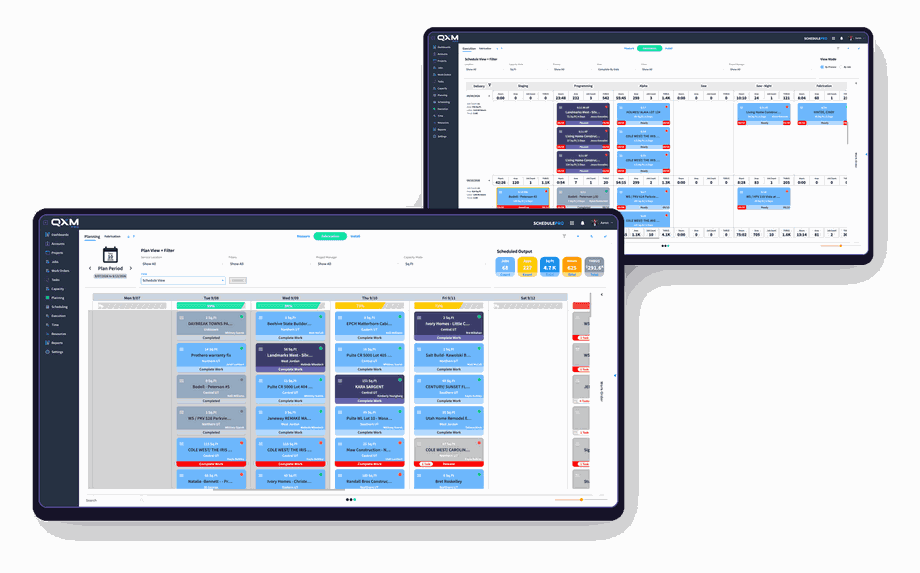
Three views of the same week.
Work sits at different stages of commitment, and showing it all at once clutters the picture. Plan, Schedule and Released each answer a different question without confusing the others.
What could land
Everything sold and everything expected, before any of it is committed. This is where you see capacity pressure building weeks out, while there is still time to do something about it.
What is agreed
Jobs released to the schedule with dates the business has accepted. The plan has been worked through, and the sequence is settled.
What is committed
Appointments released, resources assigned, capacity genuinely spent. This is the week the shop and the field are working, with nothing provisional in it.
Seeing how unreleased work would affect capacity, without letting it clutter the week your crews are actually working, is the difference between planning ahead and guessing.
Capacity Control in practice.
Everything above serves two ends: maximizing financial performance and operational efficiency. The features are how it works. This is what it produces.
Every job that runs through Schedule Pro records the time it actually took against the time QXM Pro predicted it would take. That comparison is where the business starts learning about itself.
The variance answers two questions at once. Whether the time was right, and whether the price built on that time was right. Knowing what your operation can genuinely produce is what makes both pricing and process improvement something you decide rather than something you guess.
Promise dates you can keep
When the schedule is built from real hours against real capacity, a date given to a customer is a calculation rather than a hope.
Absorb change without paying for it
Jobs move constantly in this business. Buffer that absorbs rather than pads means a moved job does not automatically become a late one.
Price from what you actually produce
Predicted against actual, job after job, tells you whether your rates reflect your operation. Pricing stops being an argument and becomes a number.
Find the improvement worth making
Variance by process points at where the time is genuinely going, so effort goes into the operation that will return the most rather than the one that feels worst.
See the wall before you hit it
Capacity committed months out is visible now, so adding a saw, a truck or a crew becomes a decision with evidence behind it.
The model keeps learning
Every completed job refines the prediction behind the next one. A business two years into QXM Pro is scheduling from a sharper model than one that started last month.
Margin is earned between the sale and the delivery.
Every job is won on a budget and a date. Whether you keep both comes down to how the work is resourced between the day it is sold and the day it is delivered.
Schedule Pro is where that happens, and it works because the rest of the platform feeds it.
Inventory Pro
Lead times checked before a date is committed.
Shop Pro
Actual hours by process, measured against what the schedule assumed.
Field Pro
Templating and install time captured where the work happens.
Order Pro
Community and builder work flowing into the same board as everything else.

The best fabricators in the country are already scaling with QXM Pro.
Precision · Automation · Capacity Control
Everything in the platform
- Estimating
- Drawing
- Quoting
- Contracts
- Change orders
- Purchasing
- Receiving
- Inventory
- Remnants
- Demand planning
- Scheduling
- Capacity
- Work orders
- Shop floor
- Field
- Templating
- Install
- Production work
- Reporting
- Integrations